1. Why Learn This
One pattern that works for any AI-assisted project. No vendor lock-in. Just files.
Most people who want to use AI productively feel stuck. The tools keep changing, results vanish into chat windows, and every platform wants you locked in. You invest time learning one product's interface, and six months later it's been replaced by the next thing. Meanwhile, the actual work you produced is trapped inside someone else's system.
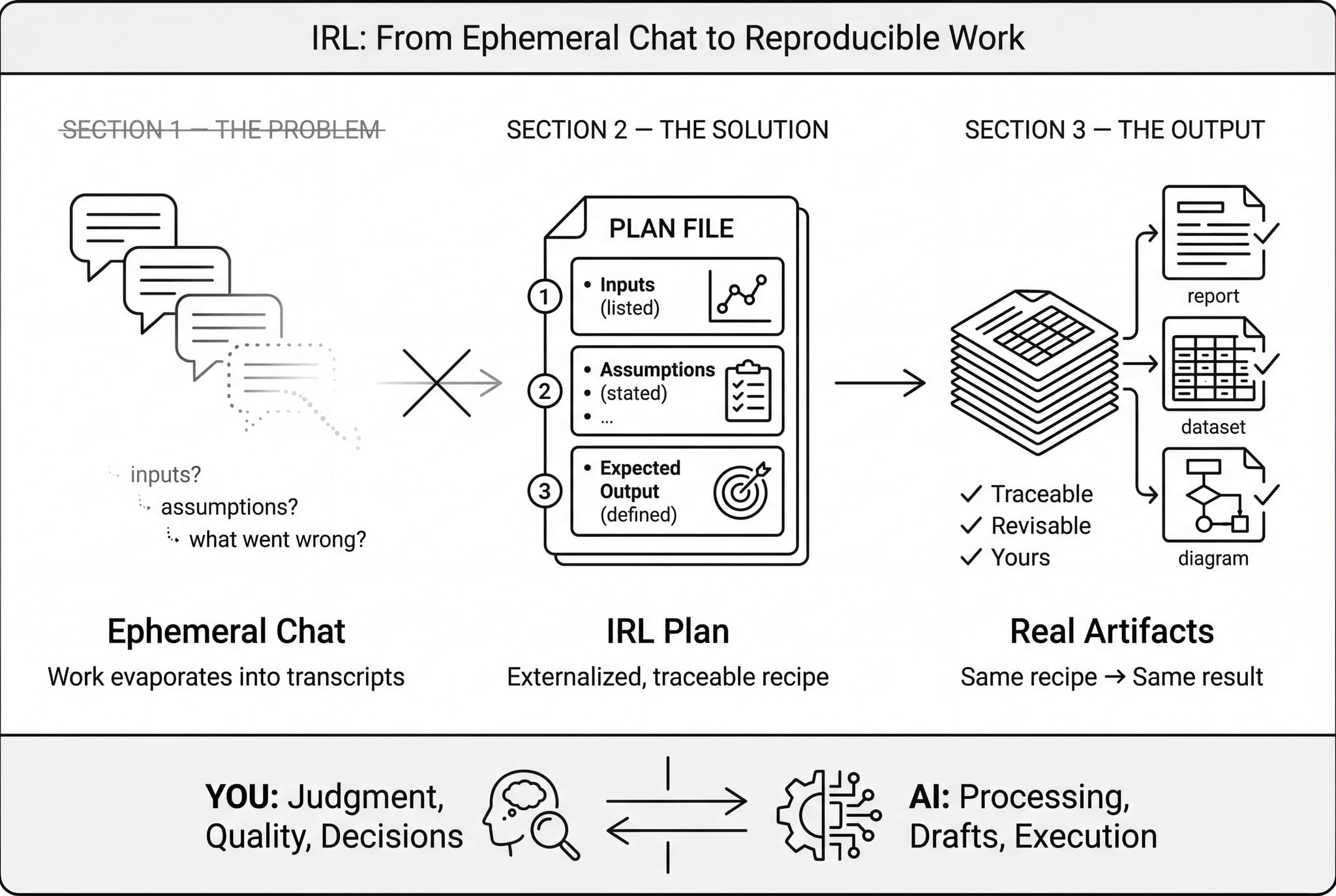
IRL is different. It's a plain-text pattern, not a product. The plan file you write is just a text document. Any AI assistant can read it. The outputs are files on your computer that you own. Nothing is stored inside a proprietary platform. If you switch AI providers tomorrow, the pattern still works exactly the same way.
Here is what a plan file actually looks like. On the left is the plain text you write; on the right is how any AI assistant interprets it.
The payoff is that you learn one workflow and can use it to build almost anything: a website, a data analysis, a literature review, an internal report, a conference poster. The structure stays the same; only the instructions change. Instead of learning a new tool for every type of project, you learn one way of thinking and apply it everywhere.
Watch how the same plan structure adapts to three different projects: a website, a data analysis, and a literature review.
A report, an analysis pipeline, a literature review: they’re all just different instructions in the same kind of plan. Learn the pattern once, use it everywhere.
2. Your Expertise, Not the AI's
This isn't about AI features or code. It's about your reasoning, your judgment, and your critical review of the output.
The elephant in the room: AI makes mistakes. But so do human assistants, and so do we. The difference isn't whether mistakes happen. It's whether you have a system for catching them. IRL puts you in the driver's seat. You write out your reasoning in the plan. The AI produces a draft. Then you review the actual output critically, not the AI's process, but the files it produced. If something is wrong, you loop back: clarify your instructions, ask for a different approach, and run again until the output earns your trust.
This is no different from managing a capable human assistant. You wouldn't hand someone a vague instruction and blindly accept the result. You'd review the work, redirect where needed, and refine until it meets your standards. IRL gives that natural feedback loop a stable structure so nothing falls through the cracks.
The key point: this is about your domain expertise, not AI features. You don't need to understand how the AI works internally. You need to know your subject well enough to evaluate what it produces. The AI doesn't need to be perfect. It needs to be directable. And you need a system for reviewing what comes back.
This is what that review process looks like in practice: you send instructions, check the output, flag problems, and iterate until it's right.
The goal isn’t a perfect AI. It’s a system where your expertise drives the process and every output earns your trust through review. No different than managing any capable assistant.
3. Same Recipe, Same Result
The core concept in plain language: run it again, get the same thing.
The word "idempotent" sounds technical, but the idea is simple. If you follow the same recipe with the same ingredients, you should get the same dish. That's the foundation IRL is built on. When you run a step in your plan, it should produce the same output every time, as long as the inputs haven't changed. No surprises, no mystery differences.
Why does this matter? Because the fastest way to lose trust in your work is to run the same step twice and get different results. If you can't explain what changed, you can't trust the output. Idempotency gives you confidence: if you rerun something and nothing is different, you know the foundation is solid. If something did change, you know exactly where to look because only the parts you deliberately modified should be different.
In practice, this means a few simple habits: give your output files stable names (not names with today's date stamped on them), spell out where inputs come from, and avoid steps that depend on "whatever the latest version is" without pinning what that means. These are small disciplines, but they're the difference between work you can build on and work that slowly drifts out from under you.
Press Run on both sides to see the difference. The idempotent side produces the same pattern every time; the other side drifts with each run.
The teal side is safe to rerun: the constellation always settles into the same shape. The amber side drifts: positions shift, new dots appear, and you can't tell which run was "right." Idempotency is what makes iteration trustworthy.
4. The Human-AI Loop
You reason and plan. The AI executes. A report grows.
The first move is small but important: instead of keeping "what we're trying to do" inside a chat thread, you keep it in a file. That file is your control surface: the plan. It's where you state your objectives, your inputs, what the output should look like, and what "done" means. When something needs to change, you edit the plan, not your memory of a conversation.
The loop itself is deliberately repetitive. You edit the plan, the AI executes the instructions, it produces files you can inspect, you review what it made, save a checkpoint, and repeat. If any of those steps is missing, the whole thing tends to collapse back into "chat with an AI until it feels done." Notice what isn't in the loop: "remember." IRL assumes memory is unreliable. The plan file replaces memory as the source of truth, and the outputs replace "trust me" explanations as evidence.
The division of labor is clear. You bring the judgment: what matters, what's correct, what to do next. The AI brings the labor: processing data, generating drafts, following instructions without getting tired. The plan file sits between you as a shared contract. It isn't tied to any specific AI product. It's plain text that any assistant can read.
A practical rule of thumb: keep each run short enough that you can rerun it without dread. If a run takes thirty seconds to a few minutes, you'll iterate freely. If it takes half an hour, you'll avoid reruns, and that's where mistakes hide.
Here is a simplified view of what one loop cycle looks like: you provide reasoning and instructions, the AI executes, and a report builds up over successive passes.
You write a plan with your instructions. The AI reads it and produces a report. As each cycle runs, planning appears on the left, execution on the right, a visible trail of the work. You review the output, refine your plan, and loop again. Each pass builds on the last.
5. Watching It Work
A concrete walkthrough: the plan executes, outputs appear, a revision adds detail.
Here's what a single run actually feels like. You open the plan, which spells out what the AI should do: read these inputs, produce these outputs, put them in these locations. You tell the AI to execute. It reads the plan, processes the inputs, and writes the results to the files you specified. You look at what it produced. If everything is right, you save a checkpoint. If something needs adjustment, you note the revision in the plan and run again.
The second run is where it gets interesting. Say the first pass produced a summary table, but you want confidence intervals added. You write that revision into the plan: "add 95% confidence intervals to the summary table." You run again. The AI reads the updated plan, sees the new instruction, and produces a revised output. You review just the parts that changed. The rest should be untouched, and if it is, you know the foundation is stable.
A good run is boring: it changes the files you expected, produces the artifacts you asked for, and leaves everything else alone. The boring part is the point. Once runs are predictable, collaboration becomes easier. Colleagues can trust the structure, review what changed, and rerun steps without fear of breaking something.
Watch a plan execute across two loops. Notice how the revision between loops refines the output without starting over.
Each loop follows the same structure: check prerequisites, execute instructions, save a checkpoint. When the author adds a revision, the next loop picks it up and improves the output. Nothing is hidden in chat history. It all lives in files you can inspect.
6. Inside the Plan
What the plan file actually looks like. Click each section to learn what it does.
The plan file is the centerpiece of every IRL project. It's a plain text document, and you can open it in any editor. It is divided into a few clear sections. Think of it as a contract between you and the AI: you state what you want, and the AI follows the instructions to produce it.
The structure is designed so the AI knows what to do without being told twice. A First-Time Setup section handles one-time preparation, like creating folders or downloading reference data. A Before Each Loop section covers pre-flight checks that should happen every run. The Instruction Loop is the heart of the plan : the actual tasks the AI executes, in order. An After Each Loop section handles cleanup and logging. And Formatting Guidelines keep the outputs consistent.
The important thing is that this is the one place where your intent lives. When you want to change what the project does, you edit this file. When you want to understand what the project did, you read this file. When a colleague wants to reproduce your work, they start with this file. Everything flows from the plan.
Click any section label on the right to see what each part of a plan file does and why it matters.
The plan file is the single source of truth. The human writes the instructions; the AI reads and executes them. Every section has a clear role, and nothing important lives only in chat history.
7. Running the Plan
One command, run over and over. That's the whole routine.
Executing the plan is intentionally simple. You open a terminal-based AI assistant and give it the same instruction every time: "Review main-plan.md, check for any revisions, and execute." The AI reads the plan, sees what needs to be done, and does the work. It produces the outputs you specified, updates the activity log, and stops.
The repetition is the point. You don't need to re-explain the project each time. You don't need to remember where you left off. The plan file holds all of that context. Each run, the AI reads it fresh, checks what's changed since last time, and executes accordingly. If you added a revision, like "add a conclusions section to the report," it picks that up and acts on it.
After the AI finishes, you review what it produced. If the output looks right, you save a checkpoint. If something needs adjustment, you edit the plan and run again. The rhythm becomes second nature: run, review, revise, run. Each cycle, the project gets a little more complete.
This is what a typical session looks like in your terminal. The same simple command drives every loop.
This is the entire workflow: open a terminal, give the AI your plan, and tell it to execute. Each pass picks up your latest revisions and builds on previous output. The plan file is the interface.
8. Your Workspace
What the tools actually look like when you're working.
When you sit down to work on an IRL project, you'll typically have a few things open. A text editor with the plan file, so you can read and revise your instructions. A preview pane or browser tab showing the output, so you can see what the AI produced. A terminal at the bottom where you run the AI assistant. And a file sidebar showing the project folder, so you can see what files exist and what's changed.
No specific tool is required. This setup works in VS Code, Cursor, a plain text editor alongside a terminal window, or any combination you're comfortable with. The plan file is plain text, the outputs are regular files, and the AI assistant runs in the terminal. If you can edit a document and run a command, you have everything you need.
The workspace mirrors the loop itself: plan on one side, output on the other, with the AI running between them. Once you've seen it, the layout becomes intuitive. You write in the plan, run the assistant, and watch the output appear or update in the preview. Review, revise, repeat.
Click any area of the workspace below to see what each pane does, or press Tour for a guided walkthrough.
Everything lives in one place: the plan you write, the data it reads, the output it produces, and the terminal where you trigger each loop. No context is hidden. You can inspect every piece.
9. Extending with Skills
Add capabilities without changing the pattern. Skills are plug-in instructions for different domains.
Once you're comfortable with the basic loop, you can extend it with skills. A skill is simply a set of instructions that customizes the plan for a specific kind of work, like searching medical literature, analyzing datasets, generating formatted documents, or building scientific posters. Skills plug into the plan file like recipes within a recipe.
The key insight is that you never change how you work, only what the instructions say. A literature review skill might tell the AI how to search databases, extract key findings, and organize them into a structured summary. A data analysis skill might specify how to clean input files, run calculations, and produce figures. The loop is the same either way: run, review, revise.
And because skills are just plain text, they aren't tied to any commercial product. You can share them with colleagues, adapt them for your specific needs, or write your own from scratch. They're instructions, not software. If you can describe what you want done, you can turn it into a skill.
Want to see this in action? The hands-on tutorial walks through building a complete literature review using PubMed and Word document skills, from an empty project to a finished paper in about fifteen minutes.
10. Project Structure
Where files live and why the layout matters.
If you've ever inherited a project folder full of files named something like final_v7_REAL_FINAL2.xlsx, you already understand why a simple structure helps. IRL projects follow a clear convention: inputs and processed data are kept separate, outputs are the things you show people, and logs record what happened during each run.
The separation between raw data and processed data is doing real work. Raw data is sacred, and it should never be modified. Processed data is disposable: if it gets corrupted, you should be able to delete it and regenerate it by rerunning the plan from your raw inputs. Outputs are a different category entirely. They're the finished artifacts: a report, a figure, a table, a website. Outputs should have stable names so you can always find and compare them.
The plan file sits at the top level as the entry point to the whole project. When someone opens the folder, the plan tells them what this project is, what it does, and how to run it. Everything else follows from there.
my-project/
├── main-plan.md
├── 02-data/
│   ├── raw/
│   └── derived/
├── 03-outputs/
└── 04-logs/
If your data is too large to include in the project folder, you can still keep the contract: store the data elsewhere, record its location and a description in the plan, and make the steps to access it explicit. The structure is a convention, not a constraint.
11. Keeping It Reproducible
Practical habits for reproducibility: stable paths, pinned versions, no hidden assumptions.
Reproducibility sounds like an abstract principle, but in practice it comes down to a few concrete habits. Give your output files stable names. Avoid stamping today's date into the filename unless you specifically want a historical snapshot. Use explicit paths for inputs and outputs so the AI always reads from and writes to the same locations. And if a step depends on an external resource, pin the version so that "latest" today doesn't silently become something different next month.
The review step is where reproducibility is tested. After the AI finishes a run, you look at what changed. Did it touch the files you expected? Did it accidentally modify something unrelated? Are there new outputs that shouldn't be there? The most important question is simple: does this change actually support the plan's goal, or did the AI just produce activity?
Here is the strongest signal that your project is reproducible: if you run the same step again without changing anything, nothing should be different. The same inputs, the same plan, the same output. When a rerun produces no changes, you know the foundation is solid. And that means you can build on it with confidence, hand it to a colleague, or return to it months later and pick up exactly where you left off.
If you can't make a step perfectly reproducible, the fallback is explicit: note what varies and why in the plan. The goal isn't perfection, it's transparency. A documented assumption is always better than a hidden one.
12. Getting Started: The Plain-Text Way
All you need is a text file and a terminal-based AI assistant.
The fastest way to start is also the simplest. Create a new folder for your project. Inside it, create a plain text file called main-plan.md. Open it and write down what you want to accomplish: your objective, your inputs, what the output should look like, and how you'll know it's done. You don't need a special template. Even a few clear sentences will work.
Then open a terminal-based AI assistant, such as Claude Code, Cursor, Copilot, or any tool that can read files and follow instructions. Give it one instruction: "Review main-plan.md, check for any revisions, and execute." The AI reads your plan, does the work, and produces the files you asked for. You review the output. If something needs adjusting, add a revision to the plan and run again.
That's the entire workflow. No installation, no configuration, no account to set up. The plan file is yours, the outputs are yours, and the pattern works with whatever AI assistant you have access to. You can be running your first project in under five minutes.
IRL is a pattern, not a product. Starting with plain text reinforces that. Once you're comfortable with the loop, you can add structure gradually, like separate folders for data and outputs, a log file, version control. But none of that is required to begin.
13. Getting Started: The IRL App
A lightweight app that sets up the project structure for you.
If you'd rather skip the manual setup, the IRL app creates a properly structured project in one step. Give it a short description of your project, and it builds the folder layout automatically: a plan file ready for editing, separate directories for data, outputs, and logs, and a date-stamped project name so your work is organized from the start.
The app also supports templates. If you're doing a literature review, a data analysis, or building a website, you can start from a pre-written plan that already has the right structure for that kind of project. Templates are just starting points, and you'll customize the plan to fit your specific goals, but they save you from writing the boilerplate sections from scratch.
It's important to understand what the app is and isn't. It's a convenience layer that produces the same plain-text structure from Section 12, just faster. Everything it creates is files you own: plain text, in folders on your computer. The app is open source and entirely optional. If you prefer to set things up by hand, that works just as well.
The IRL app is available on GitHub. Installation is a single command, and the project it creates works immediately with any terminal-based AI assistant.
Ready to try it?
Build a literature review from scratch in about fifteen minutes.
Start the Tutorial →